
What Are the Benefits of Google My Business for San Antonio Therapists?
Google Business Profile or GBP (earlier Google My Business) is quintessential to SEO. A launchpad for all your SEO efforts makes you visible to therapy searches from San Antonio.
This article will find nine reasons why you should open a GBP account. And each reason is supplemented by easy tips that you can follow right away. Let's dive in.
1. Have a Web Presence Without a Website
If you don't have a website but still want to have a presence on the internet, GBP is the way to go. This free tool allows you to list your business on Google and mark the location of your business on the maps. If you want to do it right away, follow the below steps:
- Click on 'Add your business to Google.'
- Type in the name of the business and the category like grocery, photography, clinic, etc.
(You will now be prompted to add your location on the map, as shown below screenshot)
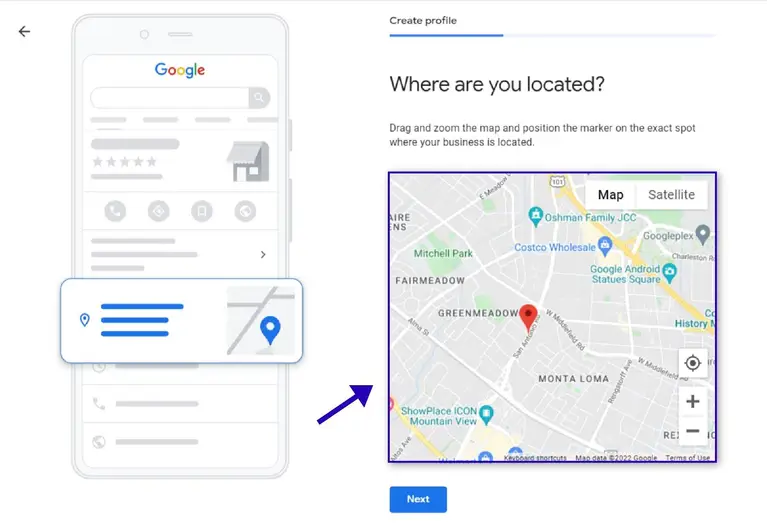
- Type in your address (make sure you enter the postal code)
- Drag the pin to the location of your business on the map
Read: Step-by-step Setup Guide for Google My Business Set up
2. Get Your Seat on the Google Three-pack
A place in the coveted Google three-pack is the end goal of many digital marketers and businesses. To get there, however, a GBP is critical. If you don't know what a three-pack is, here's a briefing:
- Google three-pack, a section on top of a SERP containing a list of three local businesses, was deemed most relevant to the search query. It looks as shown in the below image:
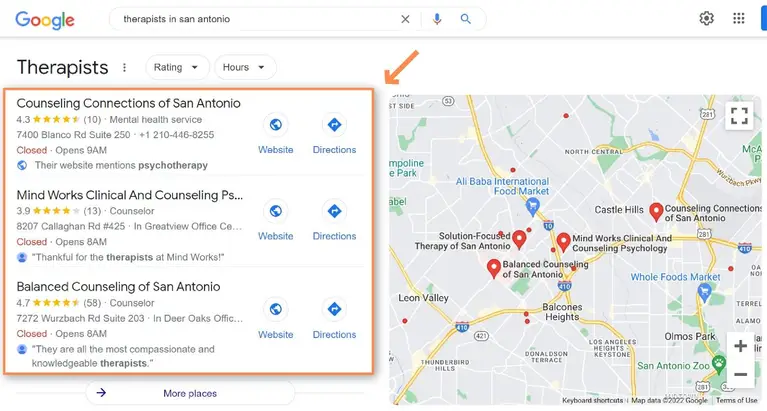
You might already have come across it when you make any 'near me searches’. Having a place on the three-pack means getting more attention than other organic results.
Note: Ranking on three-pack on Google depended on proximity, prominence, and relevance. Even among these, proximity takes center stage. This became clear after the December 2021 update on the three-pack results.
3. Get Your Business Show up on Google Map
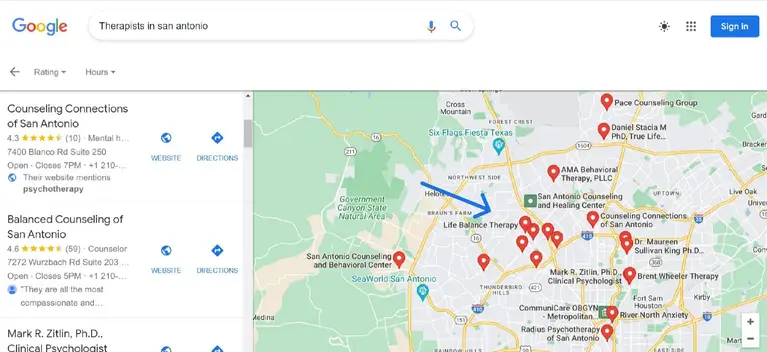
Around 86% of people with smartphones use Google Maps to find businesses online. San Antonio therapists need a GBP as a listing makes it easy for users to find you.
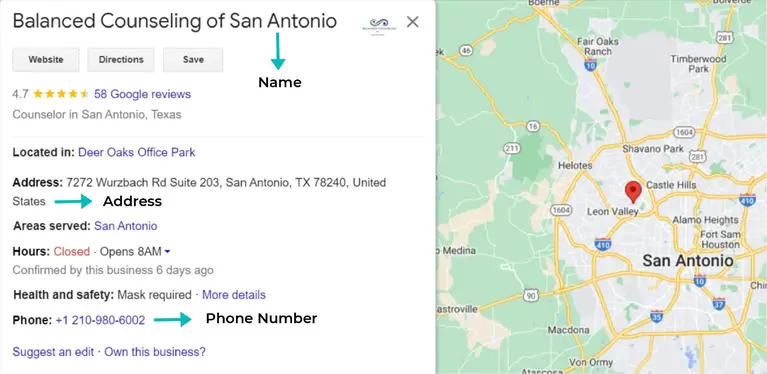
Thus, most therapists have created their location on Google maps, as shown in the below screenshot.
Moreover, those who find a business through GBP are 50% more likely to visit your clinic.
Now, if you want to rank high on Google Maps search results, follow these tips:
- Citations: This appeals to the 'proximity' factor of the GBP. Add your NAP (name, address, and phone number) to local directories of therapists in San Antonio.
- Backlinks: Obtain backlinks from high-authority websites to appeal to the 'relevance' factor. You can use guest posts or articles on reputable publications to obtain these links.
- Verify your GBP: Verification can be done using phone, email, or video recordings. This will further validate the integrity of your business.
4. Allows Users to Write About You
User-Generated Content (UGC) has been gaining momentum over the past decade. The most important category of it is user reviews. GBP allows your clients to comment on your services even if you don't have a website.
Here's why you should encourage UGC on GBP:
- Google regards reviews as social proof; thus, the businesses on GMB prioritize getting as many as reviews.
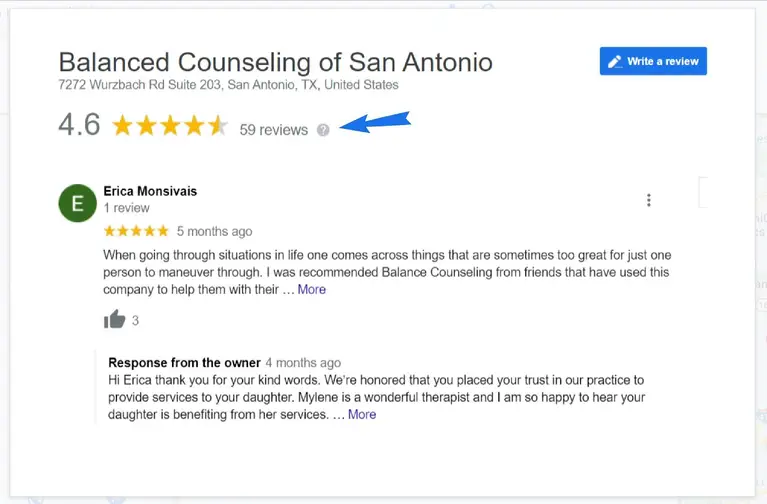
- This improves your SEO and ranking.
- Reviews are treasure troves of keywords.
- Reviews increase sales by serving as validation.
Once you add and verify your listing, you'll get control over the comment section. It is, however, advisable that you don't delete the negative comments. Instead, address the problem and win back the client's trust.
If you must report a review, however, use the following steps:
On Google Search/Maps
- On your GBP, select the review.
- Click on the vertical dots to the right
- Click on 'Flag as inappropriate.'
5. Provides You With Insights to Grow
In San Antonio, therapists still obsess over website content for SEO. Some even subscribe to fancy tools to assist them in what they deem a Herculean task by leaving an engine of their growth -- GBP -- underutilized.
If this remark raises your eyebrows, here's the justification.
In your GBP, you will find a section called 'Insights.' It offers a wide range of information about the GMB performance.
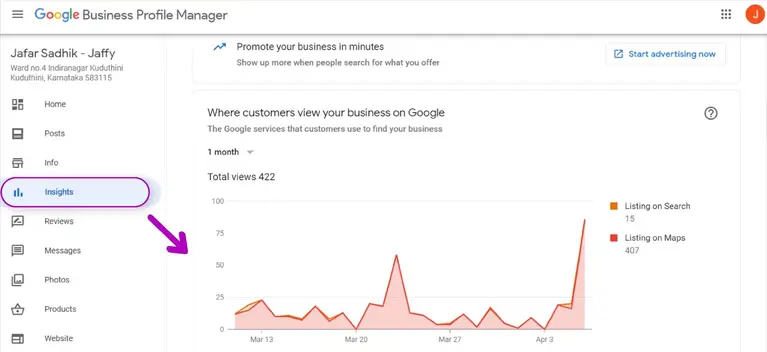
When you explore, it furnishes with data like:
- Views of your content: posts, links, photos. Etc.
- Age, location, and gender of people who follow you
- What queries do people use to find your business?
When used wisely, these numbers can greatly increase visits to your clinics:
- By analyzing the kind of posts that garner the most clicks, you can devise a content strategy.
- By studying demography, you can decide on your target customer
- By examining the queries, you can obtain keywords for future blog and social media posts.
6. An Easy to Use (Free) Premium Service!
Driving traffic to one's website is a tough task, given the competition in the therapy field. GBP helps you with this task with one of its premium features.
You can directly integrate a call-to-action button on your business listing. This prevents the need for a user first to visit your website to make an appointment.
Here’s an example to show such a listing.
-Premium-Service.webp)
Other important but often overlooked features of GBP include:
- Ease of use: Anyone with a basic understanding of web browsers can create a listing.
- Secure: Once you claim/add a listing and verify it through phone or post, only you will be able to change your settings.
- Snippet: This feature allows you to write a small intro to your business. This helps a user to assess your clinic.
Note: You can also activate a 'Chat' option on your business listing. This allows users to contact you directly from the SERP.
7. Gives Your Business A Human Touch
Therapy deals with the personal issues of a client. It requires a human face to convince them to visit you.
GBP helps you do that by helping you upload pictures and videos of your clinic and offices. It allows you to add as many as pics you have to let the customers explore.
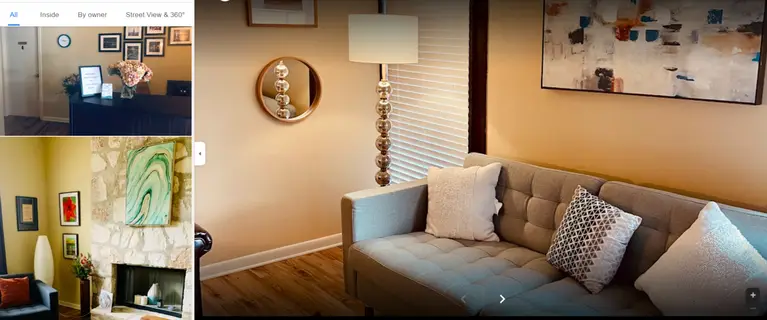
The images/videos you upload will decide whether a user will seek your service or not. Here's a list of ideas for the photos:
- Your office, reception
- Therapists exuding confidence and wisdom
- Awards or other recognitions you have received
- Surroundings of your office/clinic
- A group photo of you with your employees
Google GBP also allows you to upload 360-degree photos. They add to the appeal of the profile and improve engagement.
Tip: Upload at least 5-10 pictures on your profile. Also, mention your operational hours on weekdays and weekends.
8. Gives You an Even Ground to Compete with Rivals
The field of therapy in San Antonio is highly competitive. However, if you have a strong GBP, you are halfway through the race. Many of your competitors may not give as much importance to GBP as you might have.
Therein lies your edge! Here is a checklist for you:
- Fill as many fields on the GBP as you can and keep them up-to-date
- Seek reviews from your clients. If they are negative, address them immediately
- Keep your NAP (Name, Address, and Phone) consistent across your web assets, including GBP; ensure it’s the same as in GMB and all other citations
- Garner local backlinks and citations
- Fill the profile with good pictures.
Note: According to Google, listings with photos received 42% more clicks on 'Directions' and 35% more clicks on websites than those that didn't.
9. Declare Your Events Through Posts
It's not just pictures that you can upload onto your GBP account. You can also upload full-fledged write-ups onto it along with images. This feature can declare upcoming sessions, offers, events, or ceremonies. Make sure, however, that these posts:
- Have high-quality content
- Are of respectable language
- Have no malicious link
- Have no explicit content
Making a post on GBP is as easy as creating an account; follow these steps:
- Log on to the account you used to create the GBP
- Visit your GBP account (search your business)
- Click on 'Promote' and select the type of post as shown in the below screenshot.
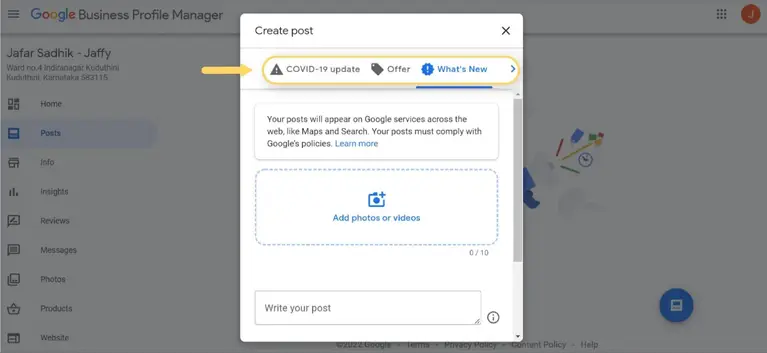
- Write/paste your write-up on the dialogue box
- Upload images, if any
- Preview your post
- Click on the 'Publish' button on the top right
Key Takeaways
- Claim your spot on the web even if you don't have a website.
- Get a chance to be on Google three-pack and garner more visits
- Appear on Google Maps to queries originating from your area
- Give users a platform to write about your services
- Get insights by analyzing data on views of posts, location of traffic, age of visitors
- Don a human face to convince your clients to visit you
- Get an even ground to compete with rival clinics
- Write about your upcoming events and offers
ABOUT THE AUTHOR:
Brice Decker

Brice has been handling marketing projects for more than 12 years and he is providing consulting services on SEO, Social Media and PPC. He has a huge expertise in working at large corporations including Accenture Interactive & PwC Digital Services.
Related Guide
SEO Tips for Schools in San Antonio
Digital Marketing Strategies for San Antonio Businesses
Digital Marketing Tips for San Antonio Roofers
Local SEO for San Antonio Bakeries
SEO Importance for San Anotonio Small Businesses
SEO Tips for San Antonio Pest Control Firms
SEO Tips for San Antonio Dentists
Gmb Setup for San Antonio Small Biz
Digital Marketing for Mompreneurs in San Antonio
ABOUT THE AUTHOR:
Brice Decker
Brice has been handling marketing projects for more than 12 years and he is providing consulting services on SEO, Social Media and PPC. He has a huge expertise in working at large corporations including Accenture Interactive & PwC Digital Services.
Related Guide
SEO Tips for Schools in San Antonio
Digital Marketing Strategies for San Antonio Businesses
Digital Marketing Tips for San Antonio Roofers
Local SEO for San Antonio Bakeries
SEO Importance for San Anotonio Small Businesses
SEO Tips for San Antonio Pest Control Firms
SEO Tips for San Antonio Dentists
Gmb Setup for San Antonio Small Biz
Digital Marketing for Mompreneurs in San Antonio